


How it works
Choose a look, sign in with Google and upload 1–3 clear photos of yourself. Select a quality option and review the credit cost. Your photos guide facial identity; the template guides styling, pose and scene. Each creation produces one new photo.
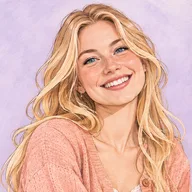
Illustrative demo · Results vary
Cute & cartoon
For cute selfies, start with an expression: a wink, a small smile or a playful hand pose. Pastel colors soften the mood; illustrated looks turn the same idea into a drawn character.
Tips for this portrait style
Can I use this as an AI cartoon portrait generator?
Yes. For a cartoon portrait, choose one of the illustrated templates and upload clear photos of yourself. For cute AI selfies with a photographic look, choose a photo template instead. AI uses your photos as identity references to create a new image; results may vary. Check the credit cost before generating.
How do I choose a cute selfie pose?
Compare the expression and framing in the examples. A close crop draws attention to a wink or smile; a wider frame leaves room for a hand pose or a colorful outfit. Choose the look first, then add clear reference photos of yourself.
Showing 26 of 26 looks
You’re all caught up. Pick a look and make it yours.